Software Reliability Testing
Functional testing proves the software works. Reliability testing proves it keeps working, under realistic use, over time. Below are the core elements of demonstrating that the allocated reliability has actually been achieved.
Why reliability has to be demonstrated, not just designed for
Every other Reliable Software SOW task builds toward this one: a program can plan, predict, model, and analyze reliability all it wants, but until it's demonstrated through realistic testing, it's still a hypothesis. This task requires test activities specifically aimed at proving the allocated reliability has been achieved.
Test Like You Operation (TLYO)
Test profiles are built from expected field usage, not just a pass/fail functional checklist.
Growth you can track
Reliability growth is tracked over test time, giving an objective trend instead of a single pass/fail gate.
What you test matters more than how long you test
Reliable software testing can accelerate the reliability growth without extending valuable schedule time or delaying the release.
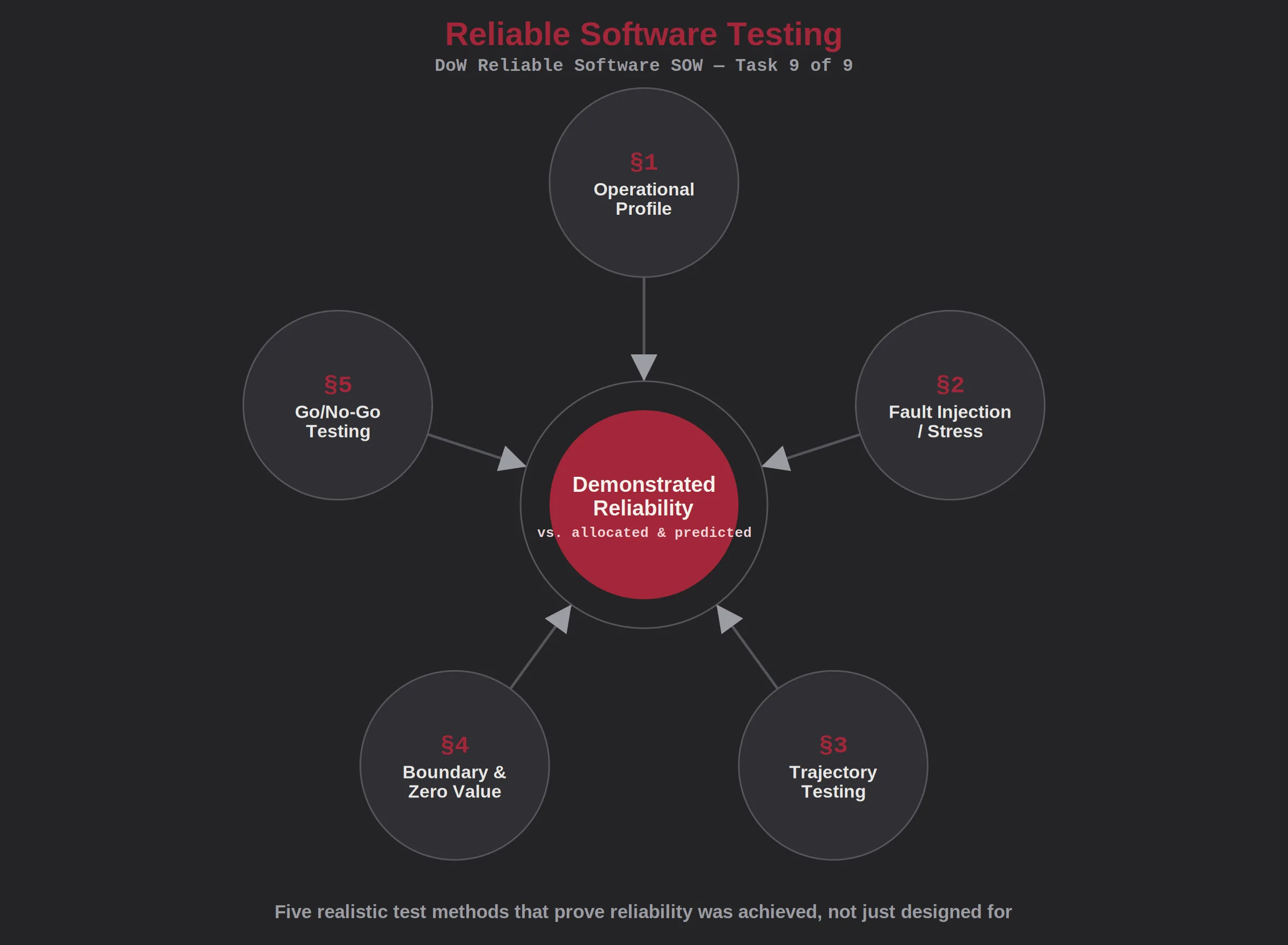
The core elements of reliable software testing
Each element below is a step in planning and executing test activities that actually demonstrate software reliability, not just functional correctness.
Operational Profile Development
The developer shall build a test operational profile that reflects expected field usage patterns and frequencies.
- Usage patterns derived from concept of operations or field data
- Test cases weighted by real-world frequency of use, not just coverage
- Profile reviewed with stakeholders familiar with actual operations
Fault Injection / Stress Testing
Testing shall specifically target failure modes identified in the Software FMEA through fault injection or stress testing.
- Test cases derived directly from high-risk software FMEA failure modes. Requs AI Software FMEA was designed to support stress testing.
- Alternatively, test cases derived directly from the Common Defect Enumeration edge case analysis. Requs AI Edge Case is a subcomponent of Requs AI Software FMEA. It identifies the relevant edge cases and provides recommendations for how to test them.
- Stress conditions representative of realistic operational extremes
- Test results feed back into the software FMEA and reduce the risk of an unexpected and costly field failure.
Reporting Results
Trajectory testing is the opposite of scripted shall testing. The tests continue over the mission profile to capture how data changes over time, validating historical state dependency, and examining data retention across operational modes.
- State Accumulation vs. Fresh Starts: Scripted "shall" tests typically start from a known, clean, initialized baseline state, run a single functional scenario, and stop. Trajectory testing deliberately feeds the software a continuous stream of data, forcing it to build upon its own historical runtime state without resets.
- Time-Dependent Variables vs. Static Inputs: A scripted discrete test verifies if Condition A yields Output B immediately. Trajectory testing evaluates data changes over long timelines. This reveals safety hazards like data drift, memory leaks, floating-point degradation, or counter overflows that only manifest after hours of continuous calculation.
- Operational Mode Crossings vs. Isolated Features: Scripted testing targets specific software requirements ("shall statements") inside a controlled sandbox. Trajectory testing watches the data retention and software safety behavior as the system continuously transitions across multiple boundaries and operational modes.
Reporting Results
Boundary and zero value testing focus on extreme mathematical limits, forcing processor exception paths, exposing precision flaws, and validating system behavior during null or sensor failures, unlike "shall" testing which typically only verifies normal, happy-path requirements. These methods ensure the system traps errors and fails safely rather than freezing, which standard functional testing often misses.
- On-Boundary Values: Testing the exact mathematical edge specified in the system constraints (e.g., if a fuel valve must close at exactly 100% capacity, testing exactly 100).
- Off-Boundary (Adjacent) Values: Testing the immediate values sitting directly on either side of the threshold (e.g., testing 99.9% and 100.1%) to expose off-by-one compilation bugs.
- Multi-Variable Boundary Overlaps: Evaluating how the system reacts when multiple independent inputs simultaneously hit their extreme limits (e.g., maximum altitude combined with minimum airspeed).
- Data Type/Buffer Wraparounds: Intentionally driving variables past their maximum structural memory limits (e.g., feeding a value of 65,536 to a 16-bit unsigned integer to see if it rolls back to 0 and crashes the system)
- Zero Sensor Inactivity: Simulating a hardware sensor failing or dropping completely to a value of exactly 0 (e.g., 0 RPM, 0 pressure, or 0 volts) to ensure the system treats it as an emergency or flag, rather than valid data
- Mathematical Extremes (Underflows): Injecting floating-point numbers that are infinitely close to zero (e.g., \(1 \times 10^{-38}\)) to check if the processor's hardware architecture truncates the value to absolute zero, which can trigger an unexpected system exception.
- Null and Empty Strings: Passing uninitialized, empty data strings or null pointers into functions expecting text strings or coordinate structures to verify the software doesn't fault.
- Asynchronous Zero States: Testing system behaviors at time zero (\(t=0\)), such as immediate power-up sequences or localized state machine restarts, where no historical data has accumulated yet.
Reporting Results
This testing focuses heavily on the veto path, ensuring that a "No-Go" status is enforced if any parameter is out of tolerance, thereby preventing accidental activation by validating that dangerous functions cannot execute unless all conditions are perfect.
- Permissive Logic Validation (The "Go" Conditions): Testing the exact matrix of conditions that must all be true before a critical action is allowed. The software must refuse to issue the "Go" command if even a single condition is missing (e.g., a missile cannot launch unless: Igniter Armed AND Target Locked AND Hatch Open)
- Veto Dominance (The "No-Go" Override): Verifying that an explicit "No-Go" or "Abort" command instantly overrides any and all active "Go" commands, regardless of where the software is in its execution cycle.
- Interlock Sequencing and Timing: Testing the strict chronological order of events. If a "Go" signal arrives out of order (e.g., an ignition signal arrives before the cooling valve opens), the software must treat it as a hazard and transition to a "No-Go" state.
- Conflicting / Corrupted Inputs: Forcing the software to handle contradictory data (e.g., Sensor A says "Go," but Sensor B says "No-Go"). Testing ensures the software defaults to the safest state—the "No-Go"—when data is ambiguous.
What realistic reliability testing buys the program
Proof, not hope
The program has objective, tested evidence that the software will hold up under real operational use.
Testing smarter is better than testing longer
With software, testing longer only grows the reliability if you test something different. Reliable software testing accelerates the growth by testing the things that people don't think about.
Confirms the other 8 tasks
Testing is where allocation, prediction, FMEA, and risk assessment all get checked against reality.
Fewer surprises after fielding
Realistic operational profiles and fault injection catch the failures that would otherwise show up in the field.
Accelerate software's reliability instead of just predicting it.
Many times, you can accelerate testing by simply switching out test vectors that don't have value for test vectors that do. We will help you cover the stresses, TLYO, boundaries, zero values, go no go tests, and fault injection in the most effective manner possible.