Software FMEA training: how to run an effective software FMEA — not just a checkbox one
See real examples of effective and ineffective software FMEA, and learn how to jump-start yours with the Common Defect Enumeration — tagged directly to system hazards.
Most software FMEAs are a checkbox exercise. This is how to make yours count.
A software FMEA that starts from a blank page usually ends up as a compliance artifact — filled out, filed away, and never actually connected to the hazards it was supposed to catch. This class teaches how to jump-start the FMEA with the Common Defect Enumeration, tag it directly to system hazards, and use it as a real software safety hazards analysis.
This class pairs naturally with Requs AI Software FMEA — but doesn't require owning it. It's built to be useful on its own.
What the class covers
Five modules, covered in a single self-guided day.
Examples of effective and ineffective software FMEA
Real, side-by-side examples of software FMEAs that actually catch failure modes, and ones that look complete but don't — and how to tell the difference at a glance.
A completed FMEA template isn't the same as an effective one. This module is the calibration the rest of the class builds on.
How to use the Common Defect Enumeration to jump-start the Software FMEA
How to start a software FMEA from the Common Defect Enumeration instead of a blank page — turning a brainstorm into a structured review of known failure modes.
Starting from a validated list of root causes is faster and more complete than starting from memory, no matter how experienced the team is.
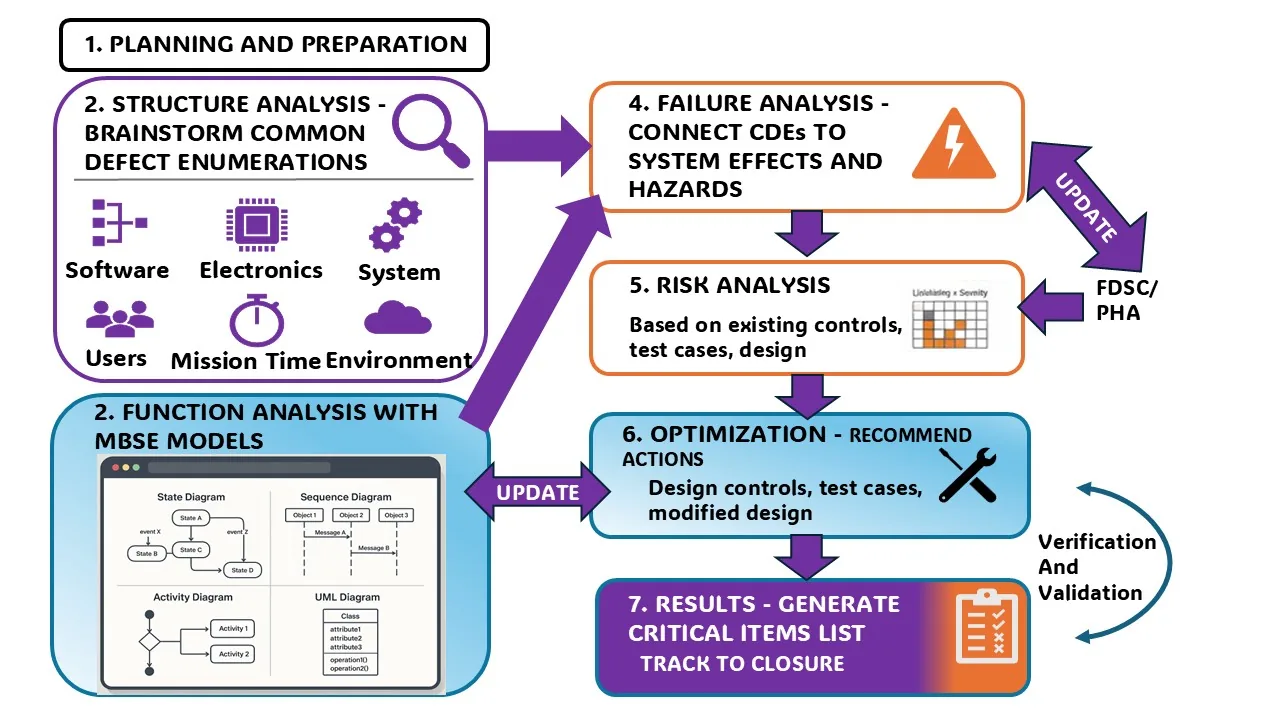
The 7-step 6D CDE Software FMEA process — starting from causal design elements (steps 2-3) and working forward through failure analysis, risk analysis, and optimization to a tracked critical items list (steps 4-7).
How to tag the Common Defect Enumeration to system hazards
How to connect each entry in the Common Defect Enumeration to the specific system hazard it can produce, so the FMEA traces all the way from root cause to consequence.
A failure mode that isn't tied to a hazard doesn't tell anyone why it matters. Tagging is what makes the FMEA actionable instead of just descriptive.
How to use the 6D CDE FMEA as a software safety hazards analysis
How to run the 6D CDE FMEA as a bottom-up software safety hazards analysis, and how it pairs with software fault tree analysis (FTA) — the top-down technique that starts from a known hazard and works backward to root causes.
Bottom-up and top-down analysis catch different blind spots. See STPA vs. the 6D CDE Software FMEA for a full comparison of the two directions.
How to navigate IEEE 1633 clause 5.2.2
A walkthrough of IEEE 1633 clause 5.2.2 — what it actually requires for software FMEA, and how to demonstrate compliance with it.
Knowing the clause by number isn't the same as knowing how to satisfy it. This module closes that gap.
Format, duration, and prerequisites
1 Day
Delivered as a single day of self-guided instruction.
Virtual, Self-Guided
Work through the material on your own schedule, at your own pace.
The Most Common Edge Cases
Required before taking this class. Requs AI Software FMEA itself is recommended but not required to own.
Run a software FMEA that actually catches something.
Register for the class, or schedule a demonstration of Requs AI Software FMEA — see the feature table and example worksheet on the product page.
Effective Software FMEA — Class Slide Deck
Preview the full class slide deck below, or download the PDF to review offline and share with your team.